You commented HOMEWORK
Parents Need
to Know.
My husband built our family an app, and now every missing assignment shows up in our inbox at 7am. No more "I don't have any homework." Here's how to set up the same morning report for your kids. You don't need to code. Claude builds it with you in about 30 minutes.
Good morning. Here's school.
Example, 7:00 AM
Kid one
Kid two
Made-up example. Yours shows your kids' real classes.
The receipts
Our real setup
This is the app my husband built for our family, with the boys' and teachers' names blurred. Your version starts simpler: one morning report. Same idea, same Canvas data.
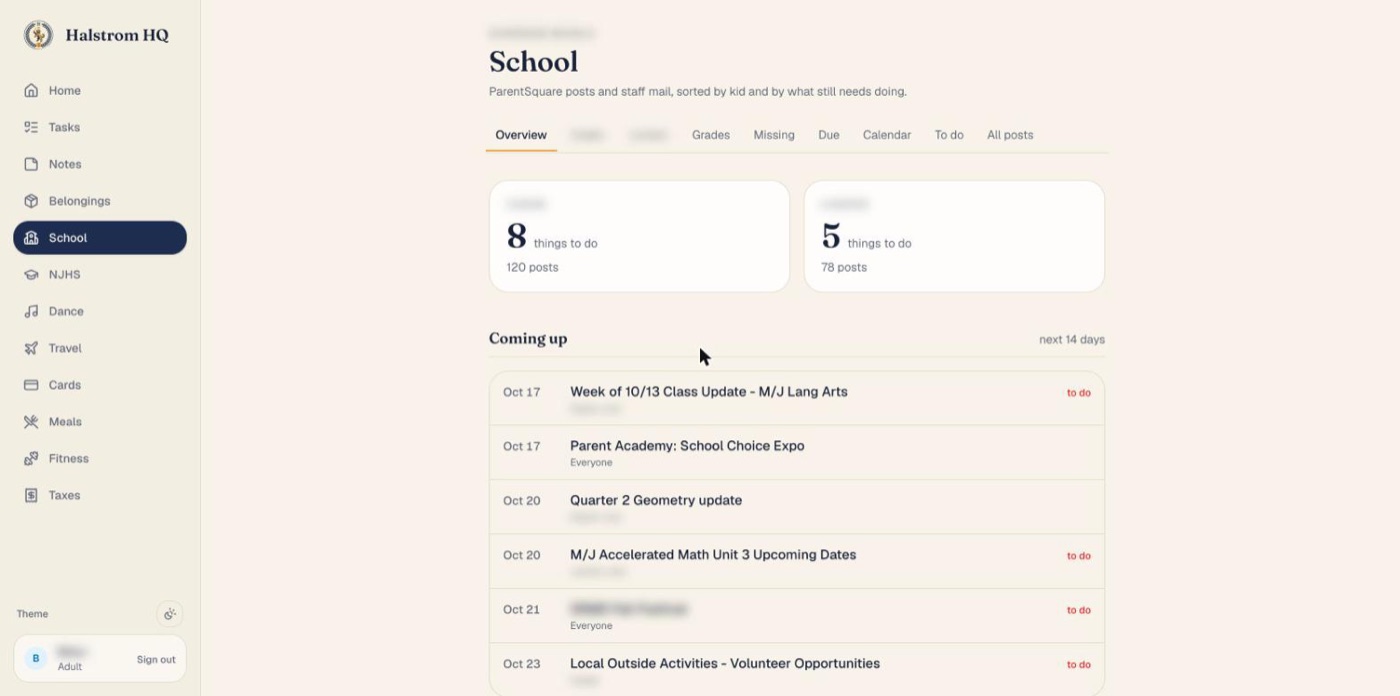
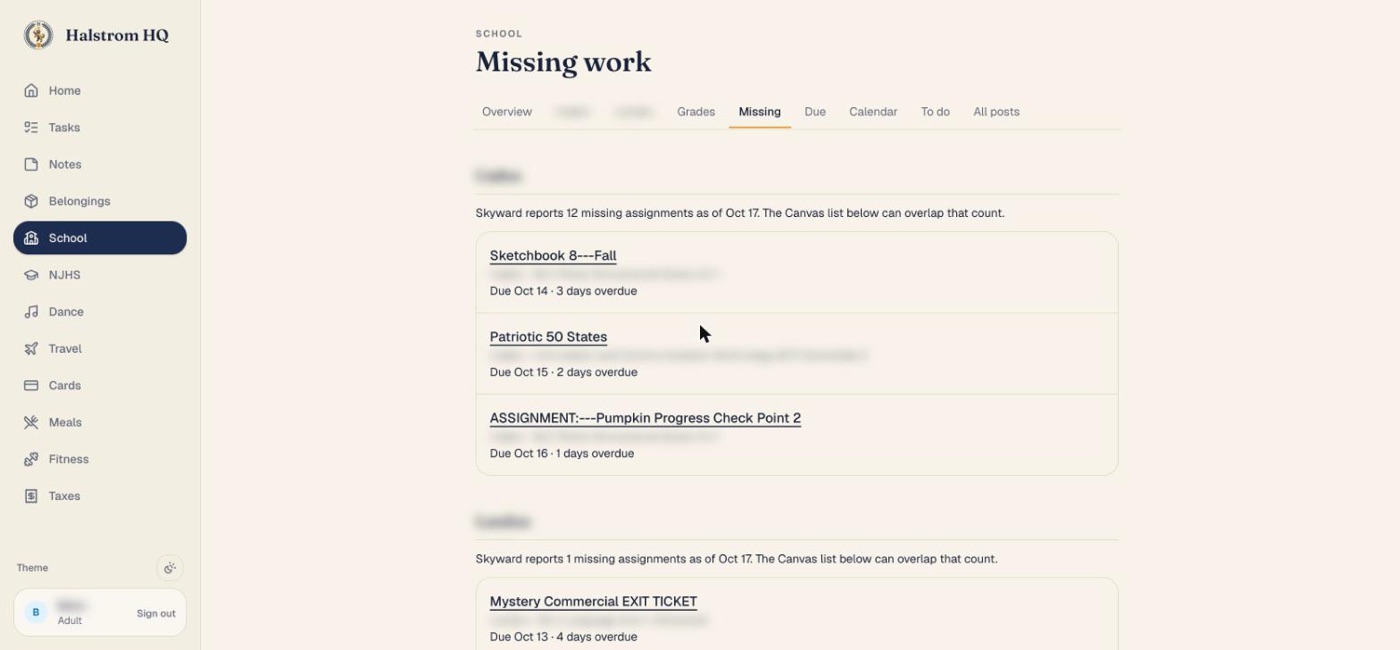
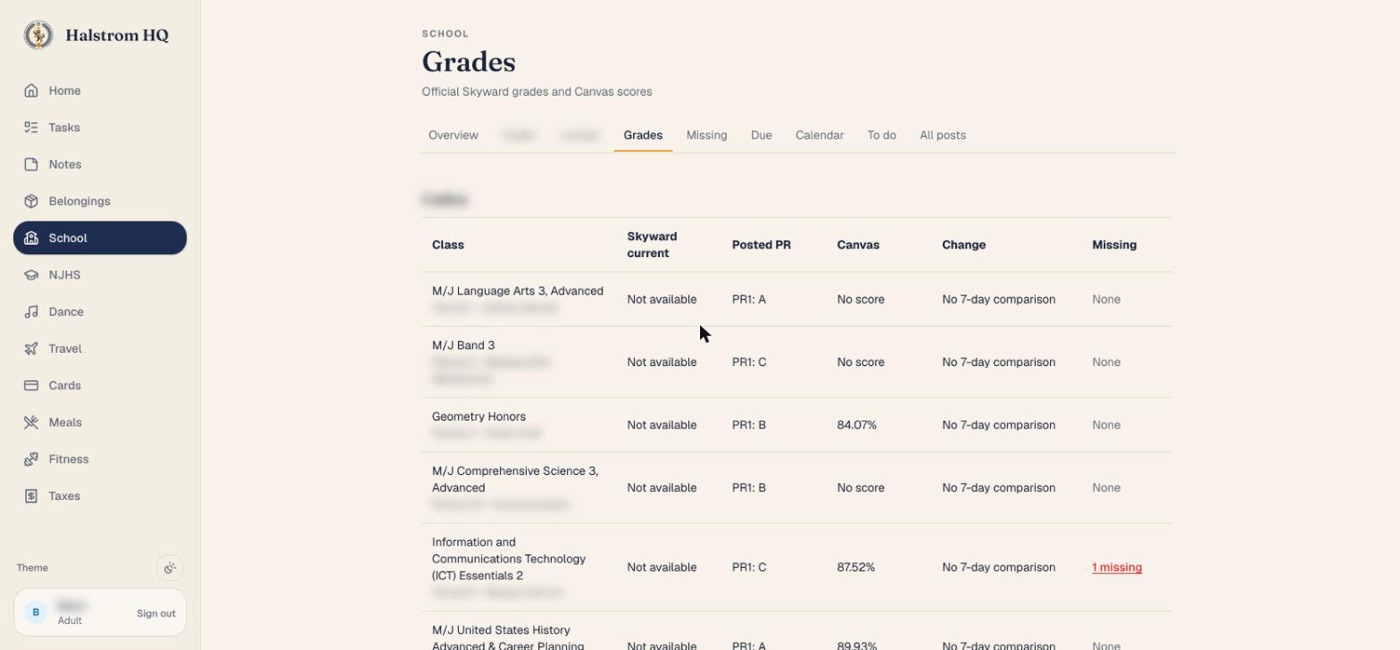
Before you start
What you need
A school on Canvas
If your district has a ClassLink parent portal, Canvas is usually one of the tiles in it.
A Canvas parent account
Canvas calls it an "observer" account. If you use the Canvas Parent app, you already have one.
A Mac or Windows computer
The report runs on your own computer, so nothing about your kids gets hosted anywhere.
A Claude Pro or Max plan
That gives you Claude Code, which does the building for you.
Setup
Four steps
- 1
Make a Canvas key (on a computer, not the app)
Sign in to Canvas in a web browser as yourself, the parent. If your district sends you through ClassLink, sign in there and click the Canvas tile. Then go to:
Account → Settings → Approved Integrations → + New Access Token
For the purpose, type something like "Morning school report". Set the expiration to the last day of the school year. Click Generate and leave that page open: Canvas shows the token only once.
Don't see the button? Your district has turned access tokens off for parents, and this setup won't work there. The Canvas Parent app's own alerts are the next best thing.
- 2
Install Claude Code
Follow the install steps at claude.com/claude-code, then open it. On a Mac, the Claude desktop app's Code tab works too.
- 3
Paste the setup prompt
Copy the prompt below and paste it into Claude as your first message. It tells Claude exactly what to build and how to keep your key safe, then Claude walks you through the rest one step at a time.
When Claude asks for your Canvas key, it has you paste it into a secure system prompt (your Mac's Keychain or Windows Credential Manager), never into the chat.
- 4
Check it, then schedule it
Claude runs it once and shows you each kid's missing work. Compare it with Canvas. Once it matches, tell Claude what time you want your report each morning.
I'm a parent, and I'm new to this. Help me set up "Parents Need to Know": a morning report on THIS computer that shows each of my kids' missing assignments, what's due in the next 7 days, and their current Canvas grades. Read everything below first, then walk me through it one step at a time. Explain each command in one plain sentence before you run it, run commands yourself when you can, and keep it friendly.

WHAT IT DOES
- For each child linked to my Canvas parent (observer) account, show:
  1. Missing work: title, class, due date, link
  2. Due in the next 7 days
  3. Current grade per class (a blank grade is normal; many teachers keep grades in the district's own gradebook instead of Canvas)
- It's a clean HTML page opened in my browser, plus a short text summary. Missing work goes at the top in red and anything due soon in amber.
- It's read-only. It only ever makes GET requests to Canvas and never changes anything.

CANVAS API (verified with a real observer token)
- Base URL: ask me for my district's Canvas address. It looks like https://DISTRICT.instructure.com.
- Headers on every request:
  Authorization: Bearer TOKEN
  Accept: application/json
  User-Agent: ParentsNeedToKnow/1.0
  (Some districts return 403 when there is no User-Agent.)
- My kids: GET /api/v1/users/self/observees
- Missing work: GET /api/v1/users/KID_ID/missing_submissions?per_page=100&include[]=course&filter[]=submittable
  ALWAYS include filter[]=submittable. Without it, paper and in-class items that can't be turned in online inflate the count.
- Classes and grades: GET /api/v1/courses?enrollment_state=active&per_page=100&include[]=observed_users&include[]=total_scores&include[]=term
  In each course, find the enrollment whose user_id is the kid and read computed_current_score and computed_current_grade. Null means no Canvas grade, not an error.
- Due soon: for each course, GET /api/v1/users/KID_ID/courses/COURSE_ID/assignments?bucket=upcoming&per_page=100 and keep anything with due_at in the next 7 days.
  Do NOT use /api/v1/planner/items. Observer tokens get 403 there.
- Pagination: follow the Link header's rel="next" URL, but only if it's on the same Canvas host, and stop after 100 pages.
- If a response starts with "while(1);", strip that before parsing JSON.
- Show dates in my local timezone.

KEEPING MY KEY SAFE (do not skip)
- The Canvas token works like a password. Never ask me to paste it into this chat, and never print it, log it, or save it in a project file or an environment file.
- On a Mac: have me store it myself in Keychain with
  security add-generic-password -s parents-need-to-know-canvas -a canvas -w
  (it prompts me, and I paste it there). The script reads it with
  security find-generic-password -s parents-need-to-know-canvas -a canvas -w
- On Windows: use Windows Credential Manager through Python's keyring package, and have me enter the token in a hidden prompt.
- If Canvas returns 401 or 403, say clearly "Your Canvas key expired or was turned off" and explain how to make a new one. NEVER show "nothing missing" when a request failed. An error must look like an error.

HOW TO BUILD IT
1. Check for Python 3 (or Node if Python isn't there). Install it if needed, and keep dependencies to a minimum.
2. Put everything in a folder called parents-need-to-know in my home folder.
3. First test: list my kids by first name and their missing work. Ask me whether it matches what I see in Canvas.
4. Build the report page and open it.
5. Ask whether I want it automatically every school morning, and at what time. On a Mac, use a launchd agent; on Windows, use Task Scheduler. Have it open the report and show a notification. Only if I ask, also email it to me through my own Gmail with an app password, stored the same safe way as the Canvas key.
6. Make it easy to use anytime: when I ask you "how are the kids doing?", run the report.
7. Finish with a short cheat sheet: how to run it now, change the time, turn it off, and renew the Canvas key when it expires.

PRIVACY
- Everything stays on this computer. Don't upload the report anywhere, and don't use any outside service except Canvas (and Gmail, only if I asked for email).
- Use only first names in the report.
Read this
Your Canvas key is like a password
- Never post it, screenshot it, or paste it into a chat.
- It only reads what you can already see as a parent, and the report never changes anything in Canvas.
- You can turn it off anytime: Canvas → Account → Settings → Approved Integrations, then delete the token.
- Check your district's technology rules if you're unsure. You're reading your own family's information with your own parent account.
Questions
FAQ
My school uses ClassLink. Is that the same thing?+
ClassLink is the front door, the sign-in page with all the app tiles. The data lives in the apps behind it. This guide uses Canvas, so you just need to reach Canvas through ClassLink once to make your key.
Why do some classes show no grade?+
Many teachers keep official grades in the district gradebook (Skyward, PowerSchool, Infinite Campus, and so on) and use Canvas only for assignments. Missing work and due dates still come through.
Do I need to leave my computer on?+
For the automatic morning report, yes: the computer needs to be awake at that time. You can also just ask Claude "how are the kids doing?" whenever you like.
What does this cost?+
Canvas access is free. You need a Claude Pro or Max plan to use Claude Code. There is nothing to host and no other subscription.
Can the kids see it?+
Only if they use your computer. It runs under your account, with your key.
Want the next one?
Get my parent hacks
Busy-mom systems, family tech wins like this one, and the occasional workout you can do while dinner's in the oven. No spam, unsubscribe anytime.

Hi, I'm Jenn
Pilates instructor, lifter and mom of two middle schoolers in Central Florida. This report keeps our house sane. If you're local, come take a class with me.
The report was built by my husband Brian, with Claude.